In
order to begin registration for the Use an ISP
program, you will need the following information from Global
Network Access Inc.:
- ISP Company Name:
Global Network Assess Inc.
- Primary modem number (local)
- Secondary modem number (local)
Call (800) 236-7116 for numbers
- User name (case sensitive)
- Password (case sensitive)
User name and password will be supplied when you
signup with Global Network Access Inc.
The process below shows step-by-step instructions that you as
WebTV® subscriber will need to follow.
1. From
the WebTV Web Homepage, select "Account" from the top bar.
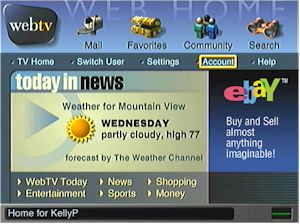
Please note: subscribers must be logged on as the
primary user. The primary user is the name the you chose
the first time they connected to the WebTV Network
service.
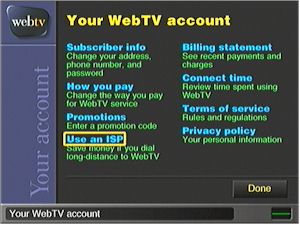
2. In
Account, select "Use an ISP."
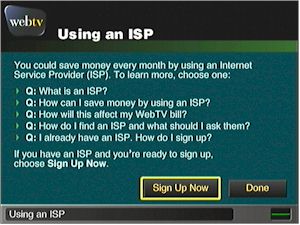
3. Choose "Sign Up Now."
4.
Enter ISP account information:
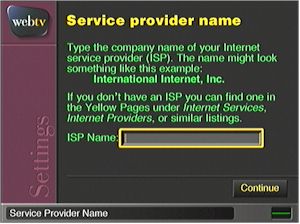
- Enter ISP company name. Choose "Continue."
- Enter primary and backup dialup modem access numbers. Choose
"Continue."
- Enter user name and case-sensitive password supplied by the
ISP. Choose "Continue."
- Confirm password. Choose "Continue."
- Choose "Use your ISP."
5. Following this set up, the WebTV Internet unit will reset and
reconnect automatically to complete the change. A confirmation
screen will appear to verify that the subscriber is using an ISP to
access their WebTV subscription.
| 

